Gelöst Google Shopping - Artikel mit Varianten richtig hochladen

Janett27

Aktives Mitglied
16. Oktober 2017
14
2
Hallo,

ich habe ein Problem bei Google Shopping.

Ich will Bekleidungsartikel hochladen. Dabei entstehen diverse Varianten nach Größe und Farbe. Um die Varianten zuordnen zu können, vergibt item_group_id die Artikelnummer des Vaters an die Kinder. Soweit so logisch. Doch im Merchant Center sagt mir die Diagnose ich soll Farbe und Größe für den Vaterartikel angeben. Der hat natürlich keine. Hat Google Shopping also nicht erkannt, dass die Varianten zusammen gehören? Er listet mir die Varianten auch alle einzeln auf und auch bei Adwords steht jede Variante einzeln, was ziemlich unübersichtlich ist, da jeder Artikel im Schnitt 30 Varianten hat. Ist das normal so?

Vielleicht hat jemand eine Idee?

LG
 

JulianG

Administrator
Mitarbeiter
14. November 2013
1.254
398
https://support.google.com/merchants/answer/6324507?hl=en

Use the parent SKU as the item_group_id for all variants of the same product.
Don't submit a parent SKU as a separate product. If you'd like to group variants using a parent SKU, use the parent SKU as the value for item_group_id for all products in the variant group.

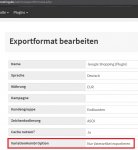
Google gibt hier an, dass man die Vater-SKU, also die Nummer, die du bei den Variationen als item_group_id angibst, nicht als seperats Produkt einstellen soll. Damit Vaterartikel nicht exportiert werden, kann man in den Exportformat-Einstellungen (Exportformat Google Shopping (Plugin)) die Option "VariationKombi Option" auf "Nur Kindartikel exportieren" setzen.
 

Charly1325

Sehr aktives Mitglied
9. März 2017
196
55
https://support.google.com/merchants/answer/6324507?hl=en

Use the parent SKU as the item_group_id for all variants of the same product.
Don't submit a parent SKU as a separate product. If you'd like to group variants using a parent SKU, use the parent SKU as the value for item_group_id for all products in the variant group.

Google gibt hier an, dass man die Vater-SKU, also die Nummer, die du bei den Variationen als item_group_id angibst, nicht als seperats Produkt einstellen soll. Damit Vaterartikel nicht exportiert werden, kann man in den Exportformat-Einstellungen (Exportformat Google Shopping (Plugin)) die Option "VariationKombi Option" auf "Nur Kindartikel exportieren" setzen.

Julian,
bitte wo setzt man im Plugin v.1.06 die Option "VariationKombi Option" auf "Nur Kindartikel exportieren" ?
Ich finde da keine Einstellmöglichkeit

Danke
Charly
 

Janett27

Aktives Mitglied
16. Oktober 2017
14
2
Das wird nicht direkt im Plugin eingestellt, sondern in den Exporteinstellungen gemacht. System -> Exportformate -> Google Shopping (Plugin) -> bearbeiten. Dann kommt man ins Menü, wo das mit den Kindartikeln steht.
 

JulianG

Administrator
Mitarbeiter
14. November 2013
1.254
398
Hallo Charly,

gar nicht. Das ist eine Exportformat-Einstellung:

firefox-2018-03-02-12-31-49.jpg

Also unter System->Export->Exportformate bei "Google Shopping (Plugin)"
 
  • Gefällt mir
Reaktionen: Charly1325

Ähnliche Themen