
_Marco_
Aktives Mitglied
- 2. Mai 2011
- 2
- 0
Hallo zusammen,
ich habe mir das Paket JTL-Wawi-Full.zip heruntergeladen und wollte es installieren. Nur leider bekomme ich einen Fehler, wenn ich die Datei SQLEXPR_DEU.exe ausführe!
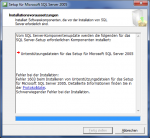
Anbei habe ich mal das Ende der Protokolldatei miteingefügt. (Die ganze Datei ist leider zu groß um sie hochzuladen)
Hier noch die Fehlermeldung von der "Summary.txt" im Ordner "C:\Program Files (x86)\Microsoft SQL Server\90\Setup Bootstrap\LOG"
Vielleicht hatte das Problem schon mal jemand?! Und kann mir weiterhelfen?
Vielen Dank im voraus!
ich habe mir das Paket JTL-Wawi-Full.zip heruntergeladen und wollte es installieren. Nur leider bekomme ich einen Fehler, wenn ich die Datei SQLEXPR_DEU.exe ausführe!
Anbei habe ich mal das Ende der Protokolldatei miteingefügt. (Die ganze Datei ist leider zu groß um sie hochzuladen)
Code:
Property(S): MsiRunningElevated = 1
Property(S): Privileged = 1
Property(S): USERNAME = Marco
Property(S): Installed = 00:00:00
Property(S): DATABASE = C:\Windows\Installer\df509.msi
Property(S): OriginalDatabase = C:\Windows\Installer\df509.msi
Property(S): UILevel = 2
Property(S): ACTION = INSTALL
Property(S): ROOTDRIVE = E:\
Property(S): CostingComplete = 1
Property(S): OutOfDiskSpace = 0
Property(S): OutOfNoRbDiskSpace = 0
Property(S): PrimaryVolumeSpaceAvailable = 0
Property(S): PrimaryVolumeSpaceRequired = 0
Property(S): PrimaryVolumeSpaceRemaining = 0
Property(S): INSTALLLEVEL = 1
Property(S): InstallNgenTicks = 70000
MSI (s) (C0:2C) [14:10:47:737]: Note: 1: 1729
MSI (s) (C0:2C) [14:10:47:737]: Produkt: Unterstützungsdateien für das Microsoft SQL Server-Setup (Englisch) -- Die Konfiguration ist fehlgeschlagen.

MSI (s) (C0:2C) [14:10:47:737]: Das Produkt wurde durch Windows Installer neu konfiguriert. Produktname: Unterstützungsdateien für das Microsoft SQL Server-Setup (Englisch). Produktversion: 9.00.5000.00. Produktsprache: 1031. Hersteller: Microsoft Corporation. Erfolg- bzw. Fehlerstatus der neuen Konfiguration: 1603.

MSI (s) (C0:2C) [14:10:47:737]: Deferring clean up of packages/files, if any exist
MSI (s) (C0:2C) [14:10:47:737]: MainEngineThread is returning 1603
MSI (s) (C0:E8) [14:10:47:737]: RESTART MANAGER: Session closed.
MSI (s) (C0:E8) [14:10:47:737]: No System Restore sequence number for this installation.
=== Protokollierung beendet: 21.07.2011  14:10:47 ===
MSI (s) (C0:E8) [14:10:47:737]: User policy value 'DisableRollback' is 0
MSI (s) (C0:E8) [14:10:47:737]: Machine policy value 'DisableRollback' is 0
MSI (s) (C0:E8) [14:10:47:737]: Incrementing counter to disable shutdown. Counter after increment: 0
MSI (s) (C0:E8) [14:10:47:737]: Note: 1: 1402 2: HKEY_LOCAL_MACHINE\Software\Microsoft\Windows\CurrentVersion\Installer\Rollback\Scripts 3: 2
MSI (s) (C0:E8) [14:10:47:737]: Note: 1: 1402 2: HKEY_LOCAL_MACHINE\Software\Microsoft\Windows\CurrentVersion\Installer\Rollback\Scripts 3: 2
MSI (s) (C0:E8) [14:10:47:737]: Decrementing counter to disable shutdown. If counter >= 0, shutdown will be denied.  Counter after decrement: -1
MSI (s) (C0:E8) [14:10:47:737]: Restoring environment variables
MSI (s) (C0:E8) [14:10:47:737]: Destroying RemoteAPI object.
MSI (s) (C0:40) [14:10:47:737]: Custom Action Manager thread ending.
MSI (c) (3C:80) [14:10:47:737]: Decrementing counter to disable shutdown. If counter >= 0, shutdown will be denied.  Counter after decrement: -1
MSI (c) (3C:80) [14:10:47:737]: MainEngineThread is returning 1603
=== Verbose logging stopped: 21.07.2011  14:10:47 ===
Hier noch die Fehlermeldung von der "Summary.txt" im Ordner "C:\Program Files (x86)\Microsoft SQL Server\90\Setup Bootstrap\LOG"
Code:
Microsoft SQL Server 2005 9.00.5000.00
==============================
OS Version      : Professional Service Pack 1 (Build 7601)
Time            : Thu Jul 21 14:10:46 2011

Machine         : PC
Product         : Unterstützungsdateien für das Microsoft SQL Server-Setup (Englisch)
Product Version : 9.00.3042.00
Install         : Failed
Log File        : C:\Program Files (x86)\Microsoft SQL Server\90\Setup Bootstrap\LOG\Files\SQLSetup0004_PC_Support.log
Last Action     : InstallFinalize
Error String    : Das Quellinstallationspaket für das Produkt Unterstützungsdateien für das Microsoft SQL Server-Setup (Englisch) stimmt mit dem Clientpaket nicht mehr überein. Wiederholen Sie die Installation mit einer gültigen Kopie des Installationspakets "sqlsupport.msi".
Error Number    : 1731
--------------------------------------------------------------------------------
PC : Unerwarteter Fehler des Setup-Assistenten. Weitere Informationen finden Sie in den Setupprotokollen oder indem Sie auf die Schaltfläche 'Hilfe' klicken.
Vielleicht hatte das Problem schon mal jemand?! Und kann mir weiterhelfen?
Vielen Dank im voraus!
