
Sportshop961
Neues Mitglied
Hey everybody,
At the moment I m looking for the best way to import my .CSV containing all the information of my articles I had in my former warehouse system (with this information: IDnummer, Artikelname, Warengruppe) , into JTL Wawi with JTL Ant. Of course I'd like to put all my articles in the right category. Before the import, I created all the categories in JTL Wawi in a "tree" like this:
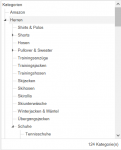
I also created multiple warengruppen to link them with the right categorie.
Is there a way for me to assign my articles contained in the .CSV into the right categorie without having to re-edit my file to create new fields like "Kategorie level 1;Kategorie level 2;Kategorie level 3" for each article because I have more that a hundred thousand of articles... I had a look on documentation but Im a bit lost at this step...
At the moment I m looking for the best way to import my .CSV containing all the information of my articles I had in my former warehouse system (with this information: IDnummer, Artikelname, Warengruppe) , into JTL Wawi with JTL Ant. Of course I'd like to put all my articles in the right category. Before the import, I created all the categories in JTL Wawi in a "tree" like this:
I also created multiple warengruppen to link them with the right categorie.
Is there a way for me to assign my articles contained in the .CSV into the right categorie without having to re-edit my file to create new fields like "Kategorie level 1;Kategorie level 2;Kategorie level 3" for each article because I have more that a hundred thousand of articles... I had a look on documentation but Im a bit lost at this step...