Neu E-Mail-Vorlagen HTTP 500 Error

yousuf1131

Mitglied
13. August 2025
42
1
Hello,

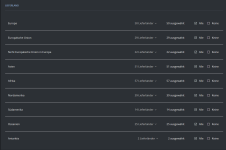
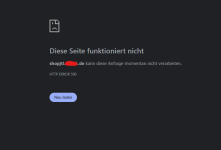
I can't access the email templates page. I'm getting an HTTP error 500.
1759904253649.png

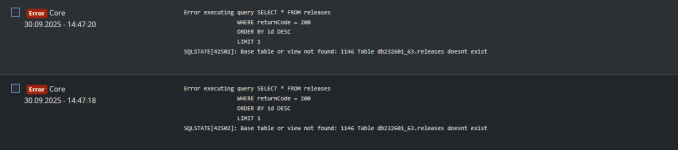
Below is an error from the logbook. I'm not sure where to find the release tables.
1759826615102.png

Background: Following the advice of a similar issue posted here on December 10, 2024, I uninstalled all plugins and checked again, but it doesn't seem to work for me.

Additional comments that may be unrelated: I can't synchronize the shop and Wawi when it's in maintenance mode. It only works if I take the shop out of maintenance mode. It's been working so far.
 
Zuletzt bearbeitet:

MHillmann

Moderator
Mitarbeiter
11. Oktober 2018
1.351
510
Hey,

these are 3 different issues.
For the 500 errror on the emails page, this might help: https://forum.jtl-software.de/threads/fehler-beim-bearbeiten-der-email-templates.240566/
The shop sync maintenance Problem is this: https://issues.jtl-software.de/issues/SHOP-9083 (fix in comments)

The problem with the releases table is a bit strange, the table should exist and was added in this migration: https://gitlab.com/jtl-software/jtl...es/src/Migrations/Migration20230516103300.php
I am not sure, if its enough to execute the migration again, because its not clear to me, why this migration wasnt executed in the first place.
Best would be, to open a support ticket, so that the support colleagues can help with these issues.

Greetings
Michael
 
  • Gefällt mir
Reaktionen: yousuf1131

yousuf1131

Mitglied
13. August 2025
42
1
Hey,

these are 3 different issues.
For the 500 error on the emails page, this might help: https://forum.jtl-software.de/threads/error-beim-bearbeit-der-email-templates.240566/
The shop sync maintenance problem is this: https://issues.jtl-software.de/issues/SHOP-9083 (fix in comments)

The problem with the releases table is a bit strange, the table should exist and was added in this migration: https://gitlab.com/jtl-software/jtl...es/src/Migrations/Migration20230516103300.php
I am not sure if it's enough to execute the migration again, because it's not clear to me, why this migration wasn't executed in the first place.
Best would be to open a support ticket so that the support colleagues can help with these issues.

Greetings
Michael

Hello,

Vielen Dank für die Information. Sie haben Recht, es handelt sich tatsächlich um drei separate Probleme. Für zwei der drei Probleme habe ich bereits Lösungen gefunden. Ich werde Ihrem Rat folgen und ein Ticket für das Release-Problem erstellen.
EDIT: Ticket#202510083600831
  • Die E-Mail-Vorlagen sind sichtbar, wenn ich Deutsch auswähle. Dieser Fehler tritt auf, wenn Englisch ausgewählt ist.
EDIT: Wir haben diese Lösung getestet und sie hat nicht funktioniert. Alle Einträge haben am Ende ein "}".
  • Ich werde den Fehler im Wartungsmodus anhand Ihres Links untersuchen.
EDIT: Diese Lösung funktioniert! Danke

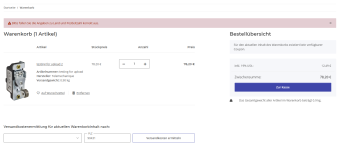
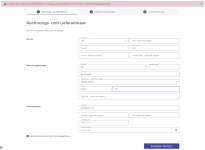
Allerdings habe ich ein neues Problem mit der Rechnungs- und Lieferadresse. Ich erhalte die Fehlermeldung „Für diesen Bestimmungsort sind keine Versandoptionen verfügbar. Bitte kontaktieren Sie uns direkt, um diese Bestellung zu bearbeiten.“ Ich habe versucht, das Kästchen anzukreuzen, damit beide Adressen gleich bleiben, aber dann erscheint diese Meldung. Der Fehler liegt in den tatsächlichen Daten – der Screenshot enthält Dummy-Daten.

1759917640279.png

1759913100169.png

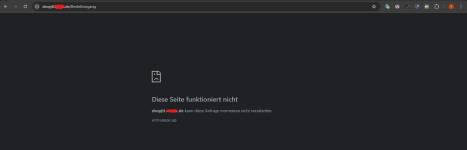
Ich konnte fortfahren, nachdem ich alle Details in der Lieferung ausgefüllt hatte, aber es führte zu einem HTTP 500-Fehler.

1759912863098.png

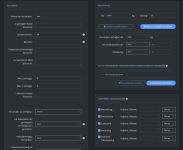
Ich habe eine Versandart mit maximalem Gewicht und allen ausgewählten Ländern erstellt und diese Versandart auch als „immer verfügbar“ zum Testen markiert, aber sie ist ebenfalls nicht sichtbar.


1759913819772.png
1759913953958.png
 
Zuletzt bearbeitet:

Ähnliche Themen