imartin_1983
Mitglied
- 14. Januar 2022
- 12
- 1
Hello,
I am having issues with importing CSV data using the defined separators (, comma) for decimals and (. period) for thousands.
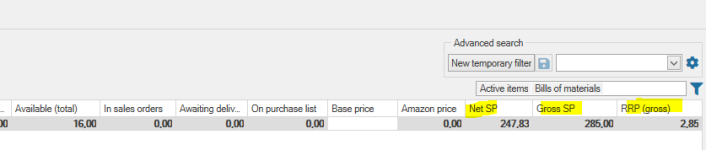
ex. Price is set to 5,90, the imported price is 590. Prices in CSV use (, comma) separator for decimals. There is no thousands separator defined.
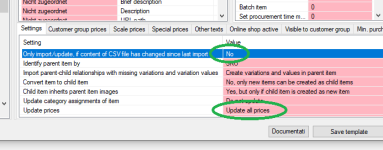
I used a simple CSV table - only SKU and Price field, column delimiter set to ( ; ). But the system can not recognize the decimal symbol (, comma) to set prices properly.
The data formating - I have tried both UTF-8 and windows-1252.
There is no way to set other delimiters in the JTL-Ant import, like space or simply nothing for thousands. So I guess a thousand separator is defined as (. period) by default, although there is no separator used in the CSV.
Also, in JTL-Wawi article section (, comma) is used as a decimal separator, but in the Customer order totals the format is like 2,123.56 EUR, with (, comma) used as a thousand separator. Not to mention currency settings.
Does that all affect how CSV import is interpreted? I mean, it seems I can not import a simple number properly.
Any idea of the cause, because I have been playing all day and it looks like some formatting, or incompatability issue. The CSV is exported from Google sheets, Open Office and excel. None works. Still same results, the system does not recognize the separator properly. I am not German, so not sure if it has anything to do with localisation, Windows version or server version.
Version used: JTL- Wawi 1.6.33.1
Windows 10 ENG
MS SQL Server 2017 ENG
Thanks for any info.
Regards
Martin
I am having issues with importing CSV data using the defined separators (, comma) for decimals and (. period) for thousands.
ex. Price is set to 5,90, the imported price is 590. Prices in CSV use (, comma) separator for decimals. There is no thousands separator defined.
I used a simple CSV table - only SKU and Price field, column delimiter set to ( ; ). But the system can not recognize the decimal symbol (, comma) to set prices properly.
The data formating - I have tried both UTF-8 and windows-1252.
There is no way to set other delimiters in the JTL-Ant import, like space or simply nothing for thousands. So I guess a thousand separator is defined as (. period) by default, although there is no separator used in the CSV.
Also, in JTL-Wawi article section (, comma) is used as a decimal separator, but in the Customer order totals the format is like 2,123.56 EUR, with (, comma) used as a thousand separator. Not to mention currency settings.
Does that all affect how CSV import is interpreted? I mean, it seems I can not import a simple number properly.
Any idea of the cause, because I have been playing all day and it looks like some formatting, or incompatability issue. The CSV is exported from Google sheets, Open Office and excel. None works. Still same results, the system does not recognize the separator properly. I am not German, so not sure if it has anything to do with localisation, Windows version or server version.
Version used: JTL- Wawi 1.6.33.1
Windows 10 ENG
MS SQL Server 2017 ENG
Thanks for any info.
Regards
Martin