Neu Kommentar

Elo

Gut bekanntes Mitglied
11. Januar 2020
135
2
Bremen
Hallo,
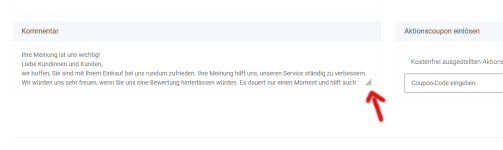
die Sprachvariable habe ich geändert shipping payment Kommentar, aber wie bekomme ich das hin das man das Fenster nicht selber erst groß machen muss, siehe Bild

Danke
 

Anhänge

  • kommentar.PNG
    kommentar.PNG
    40,7 KB · Aufrufe: 16

martinwolf

Offizieller Service Partner
SPBanner
6. September 2012
3.716
355
Hallo,
die Sprachvariable habe ich geändert shipping payment Kommentar, aber wie bekomme ich das hin das man das Fenster nicht selber erst groß machen muss, siehe Bild

Danke
Im Child-Template in der checkout/step5_confirmation.tpl im folgenden Block den Wert für "rows" entsrechend hochsetzen:

Code:
{block name='checkout-step5-confirmation-comment-body'}
    {lang assign='orderCommentsTitle' key='orderComments' section='shipping payment'}
    {textarea title=$orderCommentsTitle|escape:'html'
        name="kommentar"
        cols="50"
        rows="3"
        id="comment"
        placeholder=$orderCommentsTitle|escape:'html'
        aria=["label"=>$orderCommentsTitle|escape:'html']
        class="checkout-confirmation-comment"
    }
        {if isset($smarty.session.kommentar)}{$smarty.session.kommentar}{/if}
    {/textarea}
{/block}